Raycast: The Ultimate Productivity Tool for Mac Power Users
- Technology Paul
- Apr 21, 2025
- 4 min read

If you're a Mac user who thrives on efficiency and loves to customize your workflow, Raycast might just become your new favorite tool. This powerful application launcher and command bar is built specifically for macOS users who want to work faster, smarter, and without ever taking their hands off the keyboard. Whether you're juggling multiple applications, switching between windows, or managing your calendar and notes, Raycast brings everything into one streamlined interface.
What is Raycast?
Raycast is a command-centric productivity app that lets you control almost every aspect of your Mac through simple keyboard inputs. While it functions as a fast and lightweight alternative to Spotlight for launching apps, that's only scratching the surface. Raycast also handles window management, clipboard history, calendar events, calculations, and even integrates with popular services like GitHub, Jira, and Google Workspace.
Think of it as your digital command center, where everything you need is just a keystroke away. It’s not just about convenience—it’s about empowering users to create a more efficient, distraction-free computing environment. The more you use it, the more it becomes second nature.
Key Features That Set Raycast Apart
Application Launcher At its core, Raycast is a blazingly fast app launcher. Press a hotkey, start typing, and your app is ready to go. Unlike Spotlight, Raycast can be customized with aliases and commands, so you can launch apps or perform actions even faster. You can even trigger web searches, open documents, or run AppleScripts with just a few keystrokes, turning Raycast into a true command interface.

Clipboard History Ever needed to get back something you copied an hour ago? Raycast’s clipboard manager keeps a searchable history of your copied items, making it easy to retrieve text, links, and images without skipping a beat. It’s especially helpful for writers, developers, or anyone who frequently copies multiple pieces of information. You can even pin frequently-used clipboard items for quick access.

Window Management Snap, resize, and organize your windows without reaching for your mouse. Raycast includes a robust set of window management tools that rival standalone apps. Assign shortcuts to common window layouts or trigger them manually—perfect for multitaskers and ultrawide monitor fans. It even supports saving window arrangements and applying them with one command.

Snippets and Text Expansion Save time on repetitive typing with Raycast’s snippet feature. Create dynamic text expansions for everything from email templates to code blocks. It’s especially handy if your work involves customer communication or development. Snippets can be inserted into any app with just a few keystrokes, and they support placeholders, making them ideal for semi-automated responses.

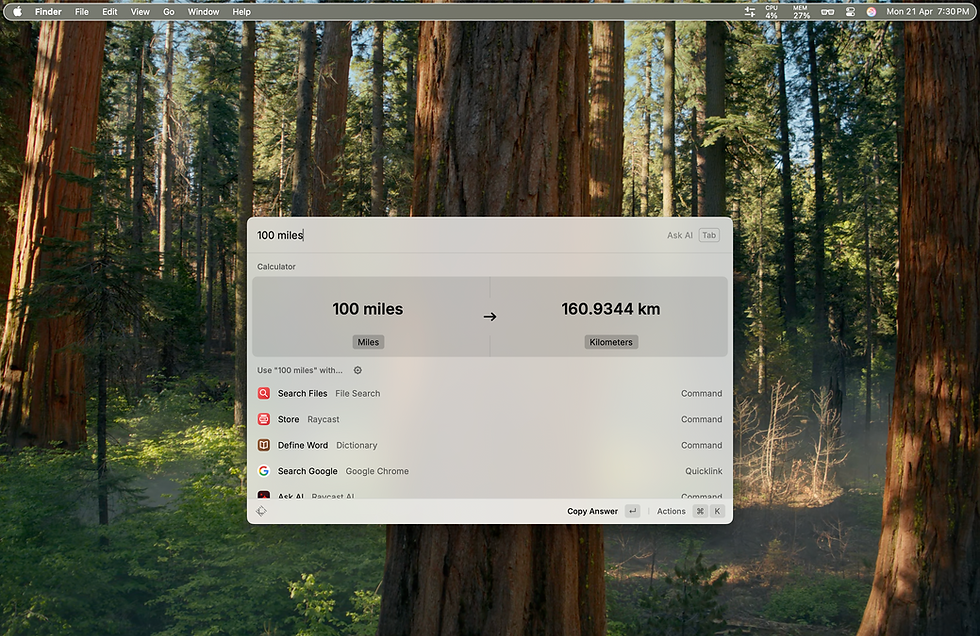
Calculator and Unit Conversion Do math or convert units and currencies on the fly—right in the Raycast command bar. It’s fast, clean, and you won’t need to launch a separate app or web browser. Raycast recognizes a wide variety of input formats, so you can do everything from simple arithmetic to complex currency conversions without missing a beat.
Calendar Integration View your agenda, create new events, or jump into your next Zoom call without ever opening your calendar app. Raycast pulls in your events and makes scheduling a breeze. It supports Google Calendar, Outlook, and more, and lets you join meetings with a single command. You can even set reminders or check your availability.

Extensions and Custom Scripts One of Raycast’s superpowers is its extensibility. Browse their growing library of community-built extensions or build your own using JavaScript. From managing GitHub pull requests to starting Pomodoro timers, there’s an extension for almost anything. Developers can publish their own extensions and even collaborate on shared tools within a team.

Raycast Notes Jot down quick ideas or lists in a lightweight notes app that supports markdown. It’s built right into Raycast, so your thoughts are always within reach. You can organize your notes with tags, search across them quickly, and even sync them across devices using iCloud or external integrations.

AI Integration For Pro users, Raycast includes AI features like writing assistance, summarization, and coding help. If you're juggling multiple tasks, AI commands can help you move even faster. You can draft emails, generate documentation, or even troubleshoot code—all from within the Raycast interface.

Getting Started with Raycast
To try Raycast, head to raycast.com and download the free version. Once installed, you’ll be guided through a brief setup to assign a global hotkey and explore built-in commands. From there, you can personalize your experience with themes, extensions, and settings that match your workflow.
The onboarding experience is intuitive, with helpful suggestions and feature walkthroughs. You’ll be productive with Raycast within minutes, but its true power becomes clear as you start building your own commands and extensions.
Free vs. Pro
The free version of Raycast is already incredibly powerful and will be more than enough for most users. However, if you want access to AI features or collaborate with a team, Raycast Pro and Team plans offer those capabilities at a monthly cost. The Pro version unlocks additional customization, cloud syncing, and priority access to new features, making it ideal for power users or professionals.
For teams, Raycast offers shared extensions, custom workflows, and administrative tools that support collaborative productivity. It’s an excellent option for startups or remote teams looking to centralize their internal tools and routines.
Final Thoughts
Raycast isn’t just a Spotlight replacement—it’s a complete productivity layer for macOS. Whether you're a developer, designer, writer, or just someone who wants to optimize their daily digital habits, Raycast offers the tools to help you work smarter. Once you start using it, you’ll wonder how you ever got by without it.
Its blend of speed, customization, and smart integrations make it one of the most exciting macOS utilities in years. And with a vibrant user community and growing extension ecosystem, it’s only getting better. If you haven’t tried Raycast yet, it’s time to see what your Mac is truly capable of.
Exploring Tech together,
Paul


Comments